jTDS and SQLEditor
What is the jTDS driver?
The jTDS driver is an open source JDBC driver (Type 4) which allows access to Microsoft SQL Server and Sybase database systems.
Can I use SQLEditor with the jTDS driver?
Yes, you can, but with limitations. We hope to improve this support in future revisions.
What limitations are there?
- SQLEditor cannot currently auto-detect the driver.
- It also doesn’t know which dialect to use so it uses the generic one.
- If you want to use SQLServer and Sybase at the same time you need to add the driver twice.
Where can I get the jTDS JDBC driver from?
The driver is available from the jTDS website
Then decompress if necessary and copy the jar file to the /Library/Java/Extensions/ directory.
How do I configure this driver?
The jTDS driver supports both Sybase and SQL Server. It requires a very slightly different configuration depending on which database system you’re using.
Follow the instructions that match your database system:
Sybase
-
Go to the Database panel of the preferences window.
-
Add a new database driver by clicking the plus button below the list.
-
Enter these details:
| Driver Name | sybase jtds driver |
| Classpath | net.sourceforge.jtds.jdbc.Driver |
| Subprotocol | jtds:sybase |
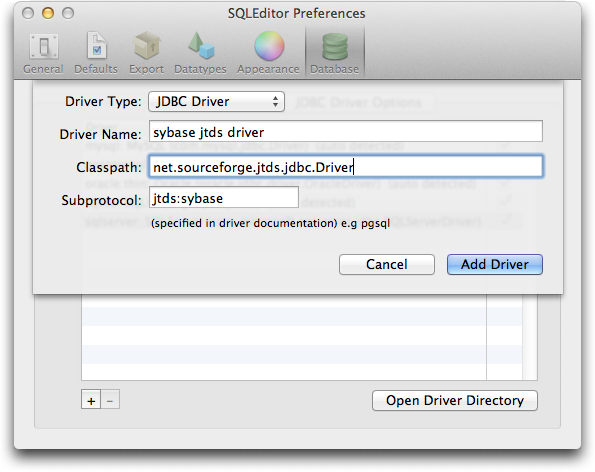
- Then click the Add Driver button.
The new driver should now be available in the Import from database and Export to Database panels.
SQL Server
-
Go to the Database panel of the preferences window.
-
Add a new database driver by clicking the plus button below the list.
-
Enter these details:
| Driver Name | sqlserver jtds driver |
| Classpath | net.sourceforge.jtds.jdbc.Driver |
| Subprotocol | jtds:sqlserver |

- Then click the Add Driver button.
The new driver should now be available in the Import from database and Export to Database panels.
Notes
-
The Driver Name field may contain any text you like, it’s not used by the database driver in any way. We used it here to distinguish between the two supported database systems.
-
If you need to use the driver with both SQL Server and Sybase, then you should add the driver twice, once with each option.
For more general information about the jTDS driver see http://jtds.sourceforge.net/
Please direct all questions about using jTDS with SQLEditor to us at support@malcolmhardie.com